

This Free Monthly Attendance Sheet Excel Template is designed to track employee or student attendance by day and session. The Template Supports First Half and Second Half (Dual Session) attendance, automatically calculates the totals Presents, Absents and leaves totals, and generates Attendance Percentages for each person row wise.
How This Monthly Attendance Sheet Helps :
- Track attendance for every day of the month.
- Record First Half and Second Half Attendance (Dual Session)
- Calculate Half Day Attendance Automatically
- Calculate the Percentage each person wise
- Track Approved and Unapproved Leaves
Download Excel Attendance Sheet:
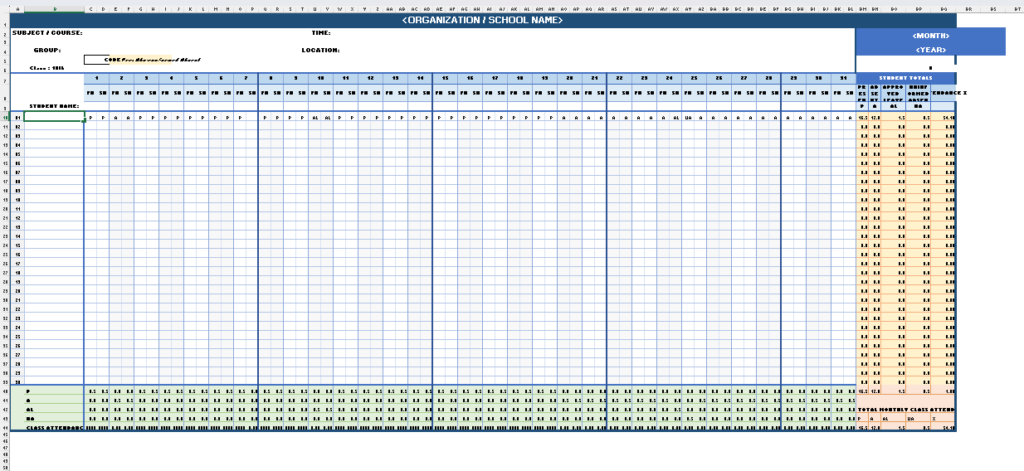
For schools, small businesses, and departments seeking simplicity without sacrificing functionality, an attendance sheet in Excel remains the gold standard. In this guide, we’ll walk you through our professionally designed monthly attendance sheet Excel free download template that features dual-session tracking (First Half & Second Half), automatic calculations, and visual status indicators.
How to Use Attendance Sheet Features:
Our well-designed attendance sheet template should contain:
1. Essential Header Information Our template includes fields for:
• Organization/School Name: Prominent branding at the top – Enter Your School or Organization Name
Subject/Course: For educational institutions: Enter Class or Course Name
• Group/Department for Organizations: Enter Group Name for Team Identification
• Time & Location: Enter Time and Location Details or else you can use Excel Formula (= NOW) OR ( =TODAY)
•Month & Year: Enter Month & Year Clear period identification or you can use
Excel Formula: =TEXT (TODAY (),”mmmm yyyy”)
2. Dual sessions Day Tracking Unlike basic templates, our attendance tracker Excel features:
• 31 days coverage: Works for any month
• Dual session columns (FH/SH): Track First Half and Second Half separately
• 62 individual session slots: Maximum granularity for accurate records
3. Smart Attendance Codes We use four distinct codes for precise tracking:
| Code | Meaning & Description |
|---|---|
| P | Present – Employee/Student was present |
| A | Absent – Unexcused absence |
| AL | Approved Leave – Pre-approved time off |
| UA | Uninformed Absent – No-show without notice |
4. Automatic Calculations The attendance sheet template automatically calculates:
• Total Present Days: Half-day precision (0.5 per session)
• Total Absent Days: Tracks all absences
• Approved Leave Count: Separate from absences
• Uninformed Absence Count: Highlights policy violations
• Attendance Percentage: Individual and class/team averages.
Master MID Function in Excel with Real time Examples
Download Your Free Attendance Sheet Template Our professionally designed attendance sheet template includes:
✅ Dual-session tracking (First Half & Second Half)
✅ 30 employee capacity per sheet
✅ 31 days coverage for any month
✅ 4 attendance codes (P, A, AL, UA)
✅ Automatic half-day calculations
✅ Individual attendance percentages
✅ Daily & monthly summaries
✅ Clean, professional formatting (Usable for both Students & Employees)
✅ Dropdown data validation
✅ Printable and readymade layout
Learn More on Excel XLOOKUP
Excel XLOOKUP Function: Everything VLOOKUP Can’t Do
Frequently Asked Questions
Q: Can I use this attendance sheet in Excel for more than 30 employees?
A: Yes! Simply insert additional rows between row 39 and 40, maintaining the formula structure.
Q: How do I track overtime with this timecard system?
A: Add additional columns (BS, BT) for overtime hours, with separate formulas for tracking.
Q: Does this work with Google Sheets?
A: Yes, the formulas are compatible. Upload to Google Drive and open with Google Sheets.
Q: Who Can Use this Template?
A: Schools and teachers, Colleges and Training Institutes, Small Businesses, HR Departments, Other Teams and Departments.
Start Tracking Attendance Today An effective employee, Student attendance sheet doesn’t need to be complicated or expensive. Our Excel-based staff attendance register gives you professional-grade tracking with half-day session precision, automatic calculations, and easy customization.
Whether you’re managing a classroom, small business, or department team, this attendance tracker Excel template provides everything you need to monitor presence, identify patterns, and maintain accurate records. Download your free monthly attendance sheet Excel template today and take control of attendance tracking.
