

XLOOKUP IS Vital & Powerful function in Excel, XLOOKUP Formula is Easy to use and has advantages over VLOOKUP, HLOOKUP & Index(Match). XLOOKUP is a modern Excel Formula it takes a value from given cell, Searches value in lookup range and returns with a corresponding value from target range. It was Introduced in August 2019 and Made available with Excel 2021 Version.
XLOOKUP FORMULA = (LOOKUP_VALUE,LOOKUP_ARRAY, RETURN ARRAY).
XLOOKUP FORMULA (If Corresponding value not found) = (LOOKUP_VALUE,LOOKUP_ARRAY, RETURN ARRAY,”NOT FOUND”)
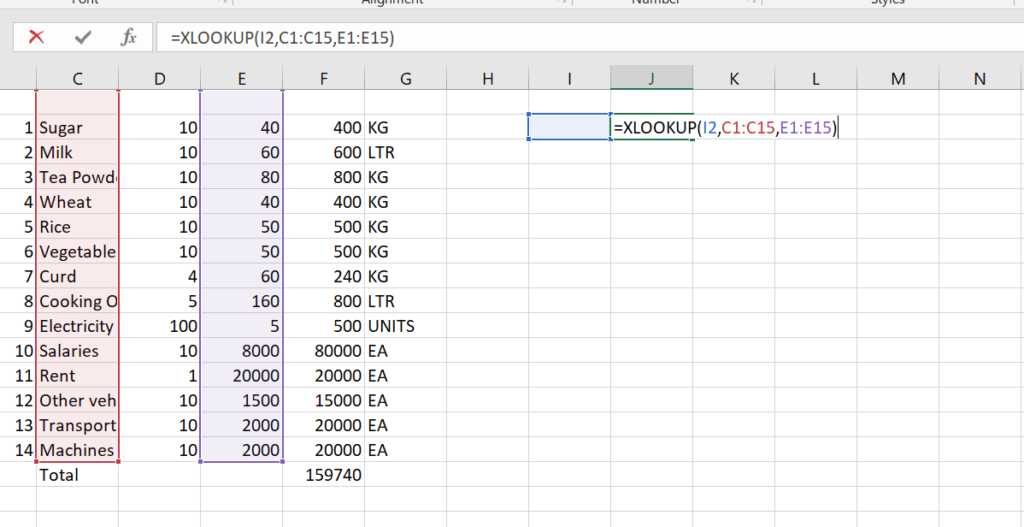
Example: The below list contains expenses related to Restaurant and owner want to find out Exact Expense value of Each Item. In that case use Formula = XLOOKUP(I2,C1:C15,E1:E15), the mentioned formula searches the value in I2 CELL, Lookup Array is C1:C15 and Return Array is E1:E15. In our case if we enter Sugar in I2 Cell it looks for the ‘Sugar” value in C1:C15 range and Returns with the value 400 from F1:F15 Range.
Another Real time example : if you are class teacher and you want to find each student marks subject wise or Total Wise. In that case you can use XLOOKUP Formula and you can get the results.
Advantages of XLOOKUP:
It can searches from Left to Right or Right To Left (In Vlookup it looks from LEFT TO RIGHT ONLY)
No need to mention Column Number
It has Built – in ” IF NOT FOUND ” Option
It support Exact Match by Default ( Like Vlookup no need to enter ‘0’ or ‘FALSE’)
It can search Top to Bottom or Bottom to Top.
It was introduced in August 2019 and made available in Excel 2021 Version.

Pingback: Master the XLOOKUP Formula in Excel with Ease - Excellities